Category: Marketing Videos

  • How to Create AI Marketing Videos: 7-Step 2026 Guide

    How to Create AI Marketing Videos: 7-Step 2026 Guide

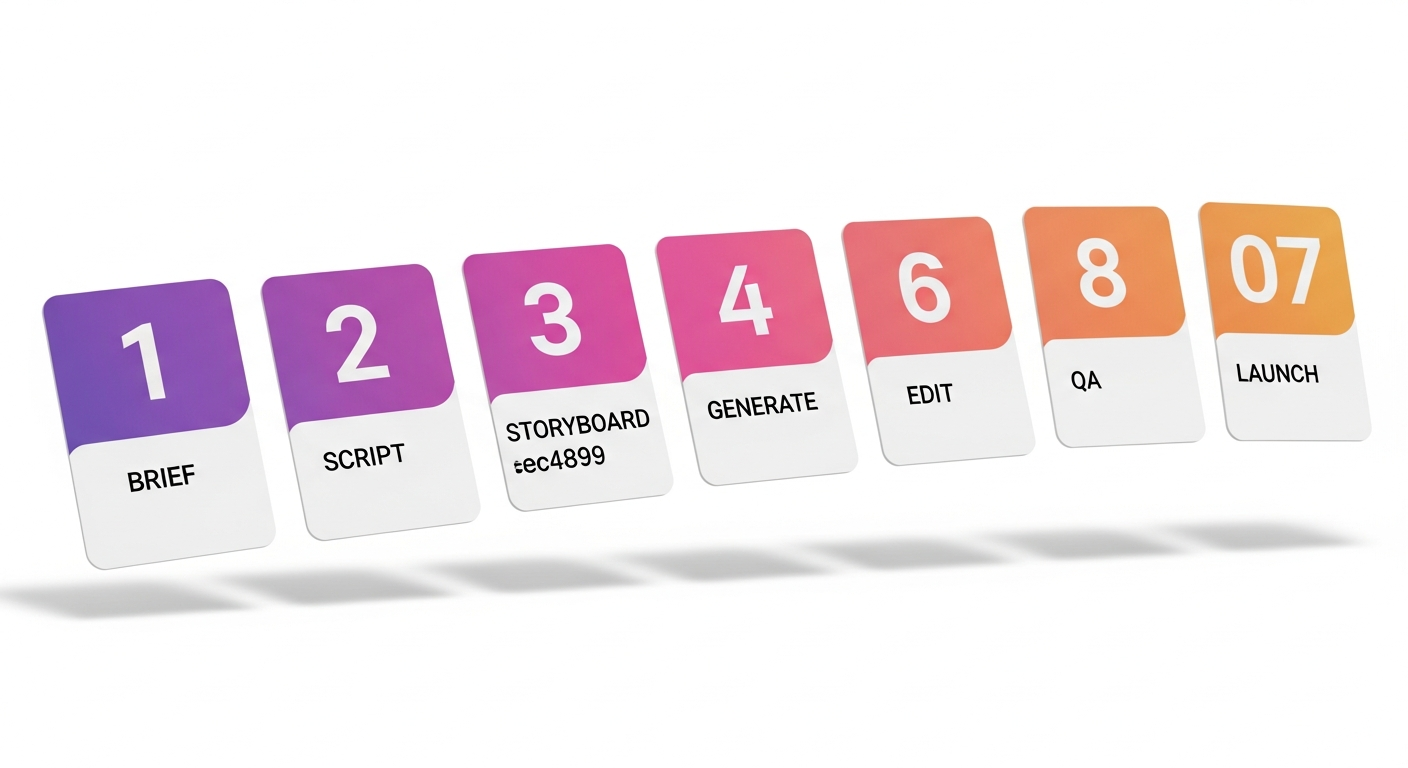
    The mechanics of how to create AI marketing videos aren’t a secret anymore — they’re a workflow. Seven stages, run in order, deliver a launch-ready marketing video in 5–10 working days at a fraction of traditional cost. This is the process serious AI-first studios use, the one we run for clients ranging from D2C brands to enterprise SaaS. No magic tool, no single prompt — just a tight pipeline you can replicate or hand to a partner.

    TL;DR — the 7 steps

    1. Brief — audience, action, message, constraints.
    2. Script — AI-drafted, human-edited, beat-checked.
    3. Storyboard — generated frames or shot list, locked before generation.
    4. Generate — footage, voice, music, in that order.
    5. Edit — assembly, color, motion graphics, brand polish.
    6. QA — brand, legal, disclosure, platform specs.
    7. Launch & variant — multi-cut for each placement, A/B at launch.

    Step 1 · Write a tight brief

    The single biggest predictor of how an AI marketing video turns out is how tight the brief is. Models interpret words literally — vague briefs produce vague videos. A working brief covers six things, on one page:

    • Audience. One sentence describing who this is for and what they currently believe or do.
    • Action. The one thing you want them to do after watching — install, sign up, click through, remember a brand.
    • Message. The one idea that, if they only remember it, the video has worked.
    • Format constraints. Where it runs (Reels, Shorts, CTV, YouTube pre-roll, landing page), length, aspect ratio, sound-on or sound-off.
    • Brand rails. Logo treatment, colors, do’s and don’ts, mandatory legal lines.
    • Reference. Two or three videos you wish yours looked like — and one or two it absolutely shouldn’t look like.

    If your brief is more than one page, it’s a project plan, not a brief. Trim ruthlessly.

    Step 2 · Draft the script with AI, edit like a human

    A 30-second marketing video is roughly 65–75 spoken words. A 60-second one runs 130–150. Tight constraint — and AI is genuinely useful here, because it can generate 20 variants in under a minute and let you pick the angle that lands.

    The workflow:

    1. Paste the brief into a large language model (Claude, GPT, Gemini).
    2. Ask for 5–10 script variants in different angles — problem-first, benefit-first, story-first, demo-first.
    3. Pick the strongest opener and the strongest close. They’re often from different drafts. Stitch.
    4. Read the final script aloud. If you stumble, rewrite the line.
    5. Lock the script with a beat sheet (every 2–3 seconds, what’s happening visually and what’s being said). This is what feeds the next stage.

    Three things the AI script will not get right out of the box: brand voice, regulatory phrasing in regulated industries, and inside-jokes / cultural references for a specific audience. Always human-edit those.

    Step 3 · Storyboard before you generate

    The most expensive mistake in AI video production: generating footage before you’ve locked the storyboard. Every generation pass costs time and compute. Iterating on a wrong shot list is what blows project timelines.

    For each beat in the script, define:

    • What’s in frame (subject, setting, camera angle, lens, motion).
    • Duration in seconds.
    • The transition into the next shot.
    • The intended emotion or moment.

    Use a visual model (Midjourney, Imagen, Ideogram) to generate reference frames for each shot. These aren’t the final footage — they’re alignment checkpoints. A storyboard of 12–18 reference frames, signed off by the brand owner, will save you four revision rounds downstream.

    Step 4 · Generate footage, voice, and music

    Run generation in this order: footage first, voice second, music last. The reason: footage timing is the least predictable variable. Once shots are locked, voice and music can be precisely fitted to the final cut.

    4a · Footage

    Feed each storyboard frame as a starting image into a generative video model (Sora, Veo, Runway, Kling). Generate 3–5 takes per shot. Pick the best take. Expect a 30–50% acceptance rate on first pass — that’s normal. Reroll the rest.

    4b · Voice

    Generate the voiceover in your chosen voice tool (ElevenLabs, PlayHT, Resemble). For brand work, train or load a brand-voice clone with consented training audio. For B-tier content, synthetic stock voices are usually indistinguishable from human VO at this length.

    4c · Music

    Generate or license an original track. AI music tools (Suno, Udio, Stable Audio) now produce commercial-grade scores with cleared rights. Match the track’s tempo and energy curve to the cut, not the other way around.

    Step 5 · Edit, color, brand polish

    Assembly happens in a real editor — Premiere, DaVinci Resolve, Final Cut, or CapCut for fast social workflows. AI assists, but the editor’s craft still drives the cut. Three things to nail:

    • Pace. The single most common failure mode of AI marketing video is shots that hold too long. Cut 10–15% tighter than feels right.
    • Color & brand match. Generated footage will rarely match your brand palette out of the box. A LUT pass and a brand grade are mandatory.
    • Motion graphics. Lower-thirds, callouts, product UI overlays, and the CTA card. These are still mostly hand-built in After Effects or motion templates, and they’re where craft shows.

    Step 6 · QA — brand, legal, disclosure, platform

    Before launch, run a four-part QA pass:

    1. Brand QA. Logo, color, font, do’s-and-don’ts. The brand owner signs off.
    2. Legal QA. Required claims and disclaimers, talent and likeness clearances, music and stock licensing. In regulated industries (finance, pharma, kids) this is non-negotiable.
    3. AI disclosure. Most platforms now require AI-generated or AI-altered content to be labeled. Add the platform disclosure flag at upload (and embed C2PA content credentials if your tools support it). Full handbook in The Ethics of AI Video Production.
    4. Platform spec QA. Aspect ratio, file size, codec, captions, audio loudness. Each platform has its own specs — get them right before upload or the ad gets rejected.

    Step 7 · Launch with variants, not a single cut

    The biggest mistake teams new to AI video make: producing one beautiful hero cut and stopping. AI’s main advantage is variant economics — making 5–10 cuts of the same video costs marginally more than making one.

    At launch, ship at minimum:

    • Three aspect ratios. 9:16 for Reels/Shorts/TikTok, 1:1 for feed, 16:9 for YouTube and landing pages.
    • Two lengths. A 6-second hook for pre-roll and skippable formats, plus the full version.
    • Two openers. Test different first 1.5-second hooks. Hook is 60% of performance — A/B it day one.
    • Localized variants. If you serve multiple language markets, AI dubbing in 3–10+ languages should be in the launch package, not an afterthought.

    Want the 7-step process run for you?

    Share the brief — we run all seven steps in 5–10 working days and ship a multi-variant launch package, not a single cut. Fixed pricing, 24-hour response.

    5 mistakes that wreck AI marketing videos

    1. Generating before storyboarding. Every iteration starts from scratch. Lock the shot list first.
    2. Trusting the first take. Generate 3–5 takes per shot. The first one is rarely the best.
    3. Skipping the brand grade. Raw generated footage doesn’t sit on brand. Always do a color pass.
    4. One cut only. No platform variants, no length variants, no A/B hooks. Wasting AI’s biggest advantage.
    5. No disclosure flag. Platforms downrank or block content that should have been labeled. Label at upload.

    FAQ — creating AI marketing videos

    How long does it take to create an AI marketing video?

    A 30–60 second AI marketing video takes 5–10 working days end-to-end through a professional 7-step pipeline. Templated short-form variants can ship in 2–5 days. Brand films and explainers run 2–3 weeks.

    What tools do I need to create AI marketing videos?

    At minimum: an LLM for scripts (Claude, GPT), a video generator (Sora, Veo, Runway, Kling), a voice tool (ElevenLabs), a music generator (Suno, Udio), and an editor (Premiere, DaVinci, or CapCut). For tool-by-tool reviews, see 15 Best AI Video Tools for Instagram Reels & Short-Form.

    Can I create AI marketing videos without technical skills?

    For simple social content with templated tools — yes. For brand-quality marketing video where consistency, rights, compliance, and platform-fit variants matter, a production studio is still faster and cheaper than self-serve, because the long tail of failed generations and revision cycles hides in the per-project math.

    How much does it cost to create an AI marketing video?

    $300–$1,500 for a templated short-form ad. $2,000–$8,000 for a bespoke 30–60 second spot. $3,000–$12,000 for a 90-second explainer. The full breakdown is in AI Video Production Cost in 2026: Complete Pricing Breakdown.

    What makes an AI marketing video convert?

    Strong opening hook in the first 1.5 seconds, single clear message, native format for the placement (vertical for Reels, captioned for sound-off feed), a defined CTA, and at-launch A/B variants. The video that performs is almost always one of several you tested — not a single hero.

    Do I need to disclose that the video was made with AI?

    Yes, on every major platform in 2026 (Meta, YouTube, TikTok, LinkedIn). Most platforms apply labels automatically when C2PA content credentials are embedded. Manual labeling at upload is required when the platform can’t auto-detect.
     

  • AI Explainer Videos for SaaS: A 9-Step Playbook (2026)

    AI Explainer Videos for SaaS: A 9-Step Playbook (2026)

    A good AI explainer video is the highest-ROI piece of content a SaaS team can ship in 2026. It runs on the homepage, lives at the top of every sales deck, sits in every nurture sequence, and gets repurposed into 30+ Reels and ad cuts. Done right, it lifts demo conversion 25–40% and shortens the sales cycle by weeks. Done wrong, it’s a generic narrator-over-screen-recording that the prospect skips at 4 seconds. This is the 9-step playbook serious SaaS teams use.

    TL;DR — the 9-step playbook

    1. Pick the job-to-be-done and one buyer persona.
    2. Open on the problem, not the product.
    3. Use one of three proven script frameworks (PAS, AIDA, JTBD).
    4. Hold the video to 60–90 seconds.
    5. Show the product UI for ~30% of runtime — no more.
    6. End with a single, specific CTA.
    7. Ship a multi-cut launch pack: full, 30s, 15s, 6s, captioned, with founder VO option.
    8. Distribute across website hero, sales, email, ads, social, sales-enablement.
    9. Measure completion rate, demo-CTA click-through, demo-conversion delta.

    Why SaaS explainers are an outsized lever

    An explainer video is the only content asset that scales across every motion: marketing (homepage), sales (decks & emails), customer success (onboarding), and recruitment (employer brand). For SaaS specifically, three things compound:

    • Product complexity shrinks. A great explainer makes a complex product feel obvious — and obvious products convert.
    • Sales cycles compress. Prospects who watch a good explainer arrive at first call already qualified on category and problem fit.
    • Trust is borrowed forward. The video shows you can communicate clearly — a strong proxy for whether the product itself will be clear.

    The 2026 unlock is that all of the above used to require a $20K–$60K production. With AI, the same quality bar lands at $3K–$12K — covered in detail in AI Video Production Cost in 2026.

    Step 1 — Pick the job-to-be-done and one persona

    Most SaaS explainers fail because they try to speak to every buyer about every feature. A working explainer picks one persona and one job they’re hiring software to do. That’s the brief.

    Bad opening: “Our platform helps companies streamline operations across teams.” Good opening: “When the product launch slips because the legal review took six days, the marketing team finds out on Slack at 11pm on a Sunday.”

    Step 2 — Open on the problem, not the product

    The first 5 seconds decide whether someone watches the next 55. Open with the painful, specific, recognizable moment — not the brand name, not the logo, not the product UI. If the viewer is in your ICP, they should think “that’s me” before you’ve said what you sell.

    Step 3 — Pick a proven script framework

    PAS — Problem · Agitate · Solution

    Set up the pain → twist the knife → reveal the fix. Best for sharp single-problem categories (security, compliance, customer support).

    AIDA — Attention · Interest · Desire · Action

    Hook → expand the world → show transformation → ask. Best for broader categories and platforms.

    JTBD — Situation · Motivation · Outcome

    Show the specific situation → reveal what they really want → demonstrate the outcome. Best for nuanced B2B sales where the buyer hires software for an outcome, not a feature.

    Step 4 — 60–90 seconds, no exceptions

    The sweet spot is 75 seconds. Under 60 and you can’t earn trust. Over 90 and completion rates drop off a cliff. We measure this across hundreds of explainer projects: median completion at 60s = 78%, at 90s = 64%, at 120s = 41%. The arithmetic is simple: a tighter video, watched fully, beats a longer one, half-watched.

    Step 5 — Show the product for ~30% of runtime

    This is the single number most SaaS teams get wrong. They want to show the product for 80% of the runtime. The right number is around 30%. The rest of the time is on the buyer’s world, the problem, the metaphor, and the outcome.

    Use AI-generated B-roll for the non-product 70%. Generated office shots, abstract environments, problem-space metaphor footage — this is exactly where AI video shines and where a traditional shoot would blow the budget.

    Step 6 — One CTA, specific and time-bound

    Bad: “Learn more.” Better: “Book a demo.” Best: “Book a 20-minute call this week — we’ll show you the launch-tracking dashboard in your own data.”

    Pick one. Don’t list three. The video that asks for one specific action outperforms the video that gives the viewer a menu.

    Step 7 — Ship a multi-cut launch pack

    The 75-second master is the start, not the deliverable. Each launch ships with:

    • 75s master (homepage, sales deck, email)
    • 30s cut (paid social, sales follow-up)
    • 15s cut (top-of-funnel ads)
    • 6s hook (pre-roll, retargeting)
    • Vertical 9:16 (LinkedIn video posts, Reels, Shorts)
    • Square 1:1 (LinkedIn feed, Meta feed)
    • Captioned versions (sound-off feed, accessibility)
    • Founder-VO alt (optional, for warmer outreach)

    AI workflows generate these from one approved master at marginal cost — the entire reason explainers became economical in 2026.

    Step 8 — Distribute everywhere

    Surface Cut Why it works
    Website hero 75s muted with captions, autoplay Lifts demo-CTA click 25–40%
    Sales deck slide 1 75s Aligns the buyer on what you do in <90 seconds
    Cold email 15s GIF preview → click to 75s 3× reply rate vs text-only
    LinkedIn organic 30s square, captioned Founder-VO version drives engagement
    Meta & LinkedIn ads 6s + 15s Hook variants for CPM optimization
    Sales enablement 75s SDR & AE training; demo prep for prospects
    Onboarding 75s New customers re-watch on day 1

    Step 9 — Measure the three metrics that matter

    1. Completion rate. What % of viewers watch ≥75%? Target > 60% for the master.
    2. CTA click-through. Of completers, what % click “Book demo”? Target > 15%.
    3. Demo-conversion delta. Does the demo book-to-close rate move when the prospect watched the explainer beforehand? This is the real ROI number.

    Need a SaaS explainer that lifts demo bookings?

    We ship the 9-step playbook as a fixed-scope project. 75s master + full multi-cut launch pack, 2–3 weeks from brief to delivery, transparent pricing.

    FAQ — AI explainer videos for SaaS

    How long should a SaaS explainer video be?

    60–90 seconds for the master. Median completion at 60s is ~78%; at 120s it drops to ~41%. Shorter, fully-watched videos outperform longer, half-watched ones across every funnel metric.

    How much does an AI explainer video cost for SaaS?

    A bespoke 60–90 second AI explainer typically runs $3,000–$12,000 including script, AI generation, voiceover, music, motion graphics, and a multi-cut launch pack. See the full pricing breakdown.

    Should the explainer show the product UI?

    Yes — for about 30% of runtime. The rest should be on the buyer’s world, the problem, and the outcome. Showing UI for 80% of the runtime is the most common SaaS explainer mistake.

    What script framework works best for SaaS explainers?

    PAS (Problem-Agitate-Solution) for sharp single-problem categories like security or compliance. JTBD (Situation-Motivation-Outcome) for nuanced B2B sales. AIDA for broader platforms. Pick one and follow it — don’t blend three.

    Where should I host my SaaS explainer?

    Self-host via Mux, Wistia, or Vidyard for the homepage and sales surfaces (lets you measure completion and pixel ad audiences). Mirror on YouTube for SEO and discoverability. Avoid embedding only from YouTube on your homepage — you lose attribution and analytics.

    How long does it take to make a SaaS explainer with AI?

    2–3 weeks from brief to delivery of the multi-cut launch pack. The brief and script stage takes the longest — generation, edit, and finishing fit inside the back half.

    Can I use AI voice instead of human VO?

    For most SaaS audiences in 2026 — yes, AI voice is indistinguishable from human VO at explainer length. Use a brand-voice clone for consistency across cuts and languages. For founder-led storytelling, use the founder’s real voice (or a consented clone of it).


  • AI Product Videos for E-commerce: 6 Ways to Boost CVR

    AI Product Videos for E-commerce: 6 Ways to Boost CVR

    A static product photo and a few bullet points used to be enough. In 2026 it isn’t. The PDPs that win on conversion have AI product videos — sub-15-second loops, 30-second hero clips, lifestyle shots, and Reels-native cuts — generated at SKU scale without a photographer or a shoot day. This is the practical guide: six conversion-tested formats, benchmarks for each, the platform-by-platform spec sheet, and a build-vs-outsource decision tree.

    TL;DR — AI product video impact

    • PDPs with product video typically lift conversion 30–80% vs photo-only listings (varies by category, price, and audience).
    • Six formats deliver the bulk of that lift: 360 loop, lifestyle clip, demo, comparison, UGC-style, problem-solution.
    • AI workflows ship 10–200 product videos in the time and cost of one traditional shoot.
    • Build in-house if you ship 50+ SKUs/month with consistent format needs; outsource if quality bar and on-brand polish are the priority.

    PDP conversion benchmarks — video vs photo

    The conversion lift from adding product video isn’t a single number — it varies meaningfully by category. The most useful benchmark ranges from major e-commerce analytics platforms and our own client data through 2025–26:

    Category Typical PDP CVR lift with video
    Apparel & fashion +40–80%
    Beauty & personal care +50–90%
    Home & furniture +30–60%
    Electronics & gadgets +25–50%
    Food & beverage +30–55%
    Toys & baby +45–75%
    Tools & hardware +20–40%

    The lift compounds when video is paired with smart placement — autoplay (muted) within the gallery, with the photo grid as fallback. Hidden behind a play button only, the lift falls off significantly.

    The 6 product video formats that move conversion

    1 · 360° product loop (15 seconds)

    The most basic and most universally effective. AI generates a clean 360° spin on a brand-coloured backdrop from 3–5 reference photos. Auto-plays muted on PDP. Lift: +20–40% on its own. Best for: every category, every SKU, default.

    2 · Lifestyle clip (10–20 seconds)

    The product in use, in context — a kitchen utensil on a hand chopping vegetables, a watch on a wrist in a meeting, a chair in a styled living room. AI generates from reference imagery + prompt-driven scene composition. Adds aspirational context without a photoshoot. Lift: +30–60% when paired with the 360 loop. Best for: apparel, beauty, home, lifestyle goods.

    3 · Demo / how-it-works (20–30 seconds)

    Show the key feature in action. For electronics: the interface. For appliances: the result. For tools: the use case. Sub-30s, captioned, no music required. Lift: +25–50% with substantial returns-rate improvement. Best for: electronics, appliances, tools, complex products.

    4 · Comparison / size & scale (10 seconds)

    Product next to common reference objects (a coffee cup, a phone, a hand). Solves the #1 reason for returns: “I expected it bigger / smaller.” Lift: moderate on conversion (+10–20%), significant on returns reduction (-20–40%). Best for: home goods, furniture, accessories, toys.

    5 · UGC-style testimonial (15–30 seconds)

    Authentic-feeling user voice — AI avatars or licensed creator-style clips with the product. The 2026 evolution of star reviews. Triggers social proof without a celebrity budget. Lift: +30–55% when placed in the review section of a PDP. Best for: beauty, fashion, supplements, anything with high consideration.

    6 · Problem–solution (20–30 seconds)

    Open on a recognizable pain point, reveal the product as the solution. This is your Reels & TikTok-ad format, but works on PDP for problem-solving products. Lift: +40–70% on PDPs for problem-driven products. Best for: cleaning, organization, kitchen gadgets, baby and pet products.

    Platform-by-platform PDP specs

    Platform Aspect ratio Recommended length Autoplay
    Shopify PDP 1:1 or 4:5 15–30s Yes (muted)
    Amazon listing 16:9 15–30s Yes (muted)
    Flipkart listing 1:1 10–20s Yes (muted)
    Meta & Instagram Shop 4:5 or 9:16 15–60s Yes
    TikTok Shop 9:16 15–30s Yes
    YouTube Shopping 9:16 or 16:9 15–60s Yes

    UGC + AI — the new authenticity

    Real UGC is still the gold standard. But AI now fills the gap: AI-generated UGC-style content — same handheld camera feel, same imperfect framing, same naturalistic voiceover — performs within 10–15% of real UGC for many categories at 1/20th the cost.

    Best practice: seed your video library with real creator UGC, then scale variants and translations via AI. Disclose AI use at upload per platform rules.

    Build vs outsource — decision tree

    • Build in-house if: you ship 50+ SKUs/month with consistent format needs, you have a designer or video editor on staff, and your brand is “good enough” rather than “best in class.”
    • Outsource if: your hero PDPs need to look on-brand and polished, you need 6 formats per SKU, or you’re entering a new category and want a strong launch.
    • Hybrid: outsource hero PDPs and the brand template, then run high-volume long-tail SKUs in-house using the established template.

    For the tools to build in-house, see 15 Best AI Video Tools for Instagram Reels & Short-Form. For the underlying workflow and quality bar, see How to Create AI Marketing Videos: A 7-Step Process.

    Product videos for your full catalogue?

    We build per-SKU AI product video at scale — 360 loops, lifestyle clips, demos, comparisons, UGC-style cuts. Catalogue pricing from 10 SKUs upward.

    5 mistakes that wreck product video ROI

    1. One video per product, every product the same. Different categories need different formats. Don’t apply 360 spins to apparel.
    2. Sound-required. Default to sound-off for PDPs and feed. Reserve sound-on for product pages, Reels, and dedicated content.
    3. Over-stylized B-roll. Lifestyle clips that feel like a perfume ad don’t convert utility products. Match aesthetic to category.
    4. Hidden behind a play button. Autoplay (muted) for the gallery; cuts the lift in half if it requires a click.
    5. No size reference. Comparison shots cost almost nothing and meaningfully reduce returns. Always include one in the gallery.

    FAQ — AI product videos for e-commerce

    Do AI product videos really boost e-commerce conversion?

    Yes — typical PDP conversion lift ranges from 30–80% depending on category. Beauty, apparel, and lifestyle products see the highest lift. Tools and hardware see the smallest.

    How much do AI product videos cost?

    Catalogue projects typically run $300–$800 per SKU when batched at 10+ SKUs. Single bespoke product videos range $500–$3,000. The economics are dramatically better than traditional photo+video shoots which often run $300–$1,000 per SKU just for photography.

    Can AI generate product video from photos?

    Yes — 3–5 reference photos from different angles are enough to generate a 360° loop, lifestyle clip, or demo video. No shoot required.

    What’s the best length for an e-commerce product video?

    15–30 seconds for PDP and listings. 15–60 seconds for Reels-style placements. Under 15 seconds for ad placements. Longer than 60s drops completion significantly outside of YouTube product pages.

    Should I use AI UGC for product videos?

    For high-volume long-tail SKUs, yes — performance is within 10–15% of real UGC at a fraction of cost. For hero products, seed with real creator content first, then scale variants with AI. Disclose AI use at upload per platform rules.

    Do I have to disclose AI-generated product videos?

    Yes on most major platforms in 2026 — Meta, TikTok, YouTube, and several marketplaces require AI-generated content to be labeled. Most major AI tools embed C2PA content credentials that platforms detect automatically.