
Category: Guides

  • AI Video Production: The Complete 2026 Guide

    AI Video Production: The Complete 2026 Guide

    AI video production has moved from novelty to default. In 2026, a single marketer with a brief, a script, and the right AI stack can ship a launch-ready 60-second ad in 48 hours — at roughly one-tenth of what the same spot cost in 2023. This guide is the practical playbook: how the new pipeline works, what it costs, where it still falls short, and how to choose a production partner who knows the difference between an AI shortcut and an AI workflow.

    TL;DR

    • AI video production is the use of generative AI models for scripting, storyboarding, footage generation, voice, music, and editing — in one connected pipeline.
    • Turnaround is roughly 3× faster and cost is typically 40–80% lower than traditional production for comparable output.
    • The 2026 stack covers five stages: brief, pre-production, generation, post, distribution.
    • AI excels at high-volume marketing, social, explainer, and product video. It still needs human craft for emotional storytelling, brand-defining hero spots, and complex live action.
    • Pick a partner who has a documented AI workflow, named tools, a rights-and-disclosure policy, and a portfolio of shipped work — not just demo reels.

    What is AI video production?

    AI video production is the end-to-end use of generative artificial intelligence across the video creation pipeline — from idea to deliverable. Instead of running each stage with a separate team and toolset, an AI-first studio chains specialist models together: a language model drafts the script, a storyboard model frames the shots, a video model generates footage, a voice model performs the narration, an audio model scores the track, and an edit model assembles the cut.

    The shift isn’t just about speed. It changes the shape of what’s possible to make. A campaign that used to ship one hero video now ships fifty cuts — one per audience segment, language, and channel. A product launch that needed a four-week production schedule fits inside a four-day sprint. The economics open up video to teams that previously could not afford it.

    Three definitions worth being precise about, because they get conflated everywhere:

    • AI-generated video — every frame produced by a generative model (e.g. Sora, Veo, Runway, Kling).
    • AI-assisted video — live-action or motion-graphic footage with AI in the workflow (rotoscoping, color, voice cloning, dubbing).
    • AI video production — the broader practice, which usually blends both.

    When this article (and most working professionals) says “AI video production,” it means the third — a hybrid pipeline where AI shows up at every stage but humans still own creative direction and final delivery.

    How AI changes the video production pipeline (the 5 stages)

    The traditional pipeline — brief, pre-production, production, post, distribution — survives in 2026. What changes is who (or what) does the work inside each box, and how long the boxes take.

    Stage 1 · Brief & strategy

    This is the one stage that hasn’t been disrupted — and shouldn’t be. AI can’t tell you what your brand stands for, who you’re trying to reach, or what action you need them to take. A solid creative brief still drives the entire downstream pipeline. The difference: with AI in the picture, the brief gets tighter, because every word in it will be interpreted literally by a model.

    Stage 2 · Pre-production (script, storyboard, shot list)

    Where the brief used to spend two weeks bouncing through scriptwriters and storyboard artists, it now takes a day. Modern AI writers like GPT-class and Claude-class models draft scripts in seconds; visual models like Midjourney, Stable Diffusion, and Imagen produce hundreds of storyboard frames in minutes. Humans still curate, but they curate from an abundance rather than building from scratch.

    For a step-by-step walkthrough of this stage, see How to create AI marketing videos: a 7-step process.

    Stage 3 · Generation (footage, voice, music)

    The headline change. Generative video models can now produce minute-long, photorealistic clips from a text prompt or a reference image. Voice models can clone a brand voice in three minutes of training audio and deliver narration in 40+ languages. AI music tools like Suno and Udio compose original scores that pass commercial-use licensing.

    What’s not yet solved: long-form coherence (most models drift after ~10 seconds), perfect character consistency across shots, and certain physical effects (fluid dynamics, complex hands, dense crowds). Studios solve this with hybrid workflows — generate the easy 80%, shoot or composite the rest.

    Stage 4 · Post-production

    AI in post is the unsung win. Color grading suggestions in DaVinci Resolve, automatic rotoscoping in After Effects, AI-driven captions and dubs across languages, denoising and upscaling — all of these compress what used to be a week of finishing into hours. This is also where most “traditional” agencies have quietly adopted AI without rebranding as “AI studios.”

    Stage 5 · Distribution & iteration

    AI’s most underrated impact is here. Once you’ve built the assets, you can spin out variants — vertical for Reels, square for feed, landscape for YouTube, 6-second for pre-roll, 30-second for Connected TV — with edit models that auto-recompose for each aspect ratio and length. Then performance data feeds back into the next round of script generation. The feedback loop, which used to be quarterly, becomes weekly.

    AI video production by use case

    Not every kind of video is equally well-served by AI today. Here’s an honest 2026 view of where it shines, where it’s adequate, and where you still want a camera and a crew.

    Use case AI suitability Why
    Marketing & performance ads Excellent High volume, short format, easy A/B testing
    Instagram Reels & Shorts Excellent 9:16, <60s, fast iteration favors AI
    SaaS explainer videos Excellent UI screen capture + AI voiceover + motion graphics
    E-commerce product videos Very good Templated formats, AI-generated B-roll, scaled per SKU
    Brand films & hero spots Mixed Emotional storytelling still benefits from live action
    Documentaries Adequate Great for B-roll & reenactment; primary interviews stay human
    TV serials & long-form Hybrid VFX, pre-viz, and dubbing are AI; principal photography stays
    Feature films Tooling AI is in the toolkit, not driving the picture (yet)

    For deeper dives by vertical, see AI explainer videos for SaaS and AI product videos for e-commerce.

    The 2026 AI video production stack

    A modern AI-first studio doesn’t run on one tool. It runs on a stack — usually 8 to 14 specialized models chained behind a producer’s workflow. The exact tools change month-to-month (this space moves fast), but the categories are stable:

    1. Scripting & ideation — Claude, GPT, Gemini for long-form scripts and ideation; specialized scriptwriters like Sudowrite for narrative.
    2. Storyboarding & concept art — Midjourney, Imagen, Ideogram, Stable Diffusion.
    3. Generative video — Sora, Veo, Runway Gen-3+, Kling, Luma Dream Machine, Pika.
    4. Voice & dubbing — ElevenLabs, PlayHT, Resemble for voice; HeyGen, Synthesia for talking-head video.
    5. Music & SFX — Suno, Udio for music; ElevenLabs SFX, Stable Audio for effects.
    6. Editing & assembly — Adobe Premiere with Firefly, DaVinci Resolve with AI tools, Descript for transcript-based edits, CapCut for social.
    7. Post & finishing — Topaz Video AI for upscale & denoise, Runway for inpainting, RotoBrush for masks.
    8. Distribution & A/B — Pencil, Omneky, VidIQ for variant generation and creative testing.

    For tool-by-tool reviews focused on short-form, see 15 best AI video tools for Instagram Reels & short-form.

    Cost & turnaround — what to budget

    The biggest single question from marketing teams: how much does this actually cost in 2026? Short answer — a wide range, driven by length, quality bar, and whether the work is templated or bespoke. A representative spread:

    Output Typical cost (USD) Typical turnaround
    15s social ad, templated $300 – $1,500 2 – 5 days
    30–60s marketing spot, bespoke $2,000 – $8,000 1 – 2 weeks
    90s SaaS explainer $3,000 – $12,000 2 – 3 weeks
    3-min brand film $8,000 – $25,000 3 – 5 weeks
    E-com product video set (10 SKUs) $5,000 – $15,000 2 – 3 weeks
    Documentary / long-form (10 min) $15,000 – $50,000+ 6 – 10 weeks

    For the full pricing breakdown — what changes the number, where to save, and how to compare quotes — read AI video production cost in 2026: complete pricing breakdown.

    Quality bar: when AI video is good enough (and when it isn’t)

    Three rules of thumb after shipping hundreds of projects:

    1. Volume + variation = use AI. If you need 50 creatives this quarter and you’ll iterate on each, the unit economics tilt heavily toward AI.
    2. Emotion + craft = stay hybrid. A hero film, a founder story, a brand anthem — AI for B-roll and finishing, humans for the moments that need a heartbeat.
    3. Compliance + reputation = check twice. Regulated industries (finance, healthcare, kids) and any campaign with named individuals need an extra disclosure and consent pass before publish.

    If you’re trying to decide between AI and a traditional shoot for a specific project, see the side-by-side in AI vs traditional video production: 7 differences that matter.

    How to choose an AI video production partner — 8-point checklist

    The label “AI video production” has been adopted by everyone from one-person freelancers running a single prompt through Runway to legitimate studios with full pipelines. Use this checklist when evaluating a partner:

    1. Documented workflow. Can they walk you through their five-stage pipeline and name the tools at each stage?
    2. Shipped portfolio. Not just demo reels — production work for paying clients in your category.
    3. Rights & licensing. Who owns the output? Are the models commercially licensed? Are music and voice rights cleared?
    4. Disclosure policy. Will they mark AI-generated content per platform rules (Meta, YouTube, TikTok all now require it)?
    5. Revision model. How many rounds are included? What counts as a revision vs. a re-brief?
    6. Turnaround SLA. First draft in X business days, final in Y — in writing.
    7. Quality safety nets. Human review checkpoints at script, generation, and final cut.
    8. Pricing transparency. Published tiers or clear quotes, not “it depends” pricing.

    Ready to ship your first AI video?

    Tell us the brief and we’ll quote a turnaround and a fixed price within 24 hours. 500+ projects shipped, 150+ clients, 50M+ views — and a studio that treats AI as a workflow, not a shortcut.

    The legal & ethical guardrails

    2026 is the year AI video stopped being a wild-west experiment and started being regulated. Three things every marketing team should know:

    • Platform disclosure. Meta, YouTube, TikTok, and LinkedIn all require AI-generated or AI-altered content to be labeled. Most platforms now apply labels automatically via content credentials.
    • Content provenance (C2PA). The Coalition for Content Provenance and Authenticity standard is now embedded in major camera and editing tools. Expect “content credentials” to become as standard as image EXIF data.
    • Likeness & voice consent. Using a real person’s face or voice — even a synthetic version — requires written consent in most jurisdictions. The EU AI Act and similar regulations in India, the US, and UK are explicit on this.

    The full handbook on this is in The ethics of AI video production: deepfakes, disclosure & trust.

    Where AI video is going (the next 18 months)

    Three trends to watch:

    1. Long-form coherence. 60-second to multi-minute clips with stable characters and continuity are arriving fast. This unlocks short films, full explainers, and episode-length content without stitching.
    2. Real-time generation. Sub-second video generation enables interactive ads, personalized openers, and AI-driven streaming — the next aesthetic after vertical short-form.
    3. Local-language dominance. India, Indonesia, Brazil, and the MENA region are leapfrogging on AI dubbing and voice cloning, making per-market localization economical for the first time.

    For a deeper look at the India market specifically, see AI video production in India: 2026 industry report and How AI is transforming Indian film & TV production in 2026.

    FAQ — AI video production

    What is AI video production?

    AI video production is the use of generative artificial intelligence across the video creation pipeline — scripting, storyboarding, footage generation, voice, music, and editing — to produce video assets faster and at lower cost than traditional production.

    How much does an AI video cost in 2026?

    A templated 15-second social ad starts around $300. A bespoke 30–60-second marketing spot ranges $2,000–$8,000. A 90-second SaaS explainer typically runs $3,000–$12,000. Brand films and long-form documentaries scale into the $15,000–$50,000+ range. Length, talent, languages, and revision rounds drive the spread.

    How fast is AI video production compared with traditional?

    Roughly 3× faster end-to-end for comparable output. A campaign that took 4–6 weeks traditionally now ships in 1–2 weeks. Some templated formats (social ad variants, product cuts) ship in 2–5 days.

    Is AI video production good enough for brand work?

    For marketing, performance ads, social, explainer, and product video — yes. For hero brand films and emotional storytelling, the best results today come from hybrid workflows: AI for B-roll, motion graphics, and finishing; live action for primary performance.

    Who owns AI-generated video output?

    Ownership depends on the model’s terms of service. Most commercial AI video tools (Sora, Veo, Runway, Kling) grant the user broad commercial rights to outputs. Always check the licence — and confirm with your production partner that the entire pipeline (including music and voice) is cleared for commercial use.

    Do I have to disclose that a video was made with AI?

    Yes — on most major platforms in 2026. Meta, YouTube, TikTok, and LinkedIn all require AI-generated or AI-altered content to be labeled. The label is often applied automatically when content credentials (C2PA) are embedded. Beyond platform rules, regulators in the EU, India, and US require disclosure for political and likeness-based content.

    Can AI video production handle non-English languages?

    Very well. AI voice and dubbing tools cover 40+ languages with native-quality output, including major Indian languages (Hindi, Tamil, Telugu, Bengali, Marathi). One source script can ship as 10+ localized variants without re-recording.

    What should I ask an AI video production company before hiring?

    Walk through their five-stage pipeline, named tools, sample of shipped client work in your category, rights and disclosure policy, revision model, turnaround SLA, and transparent pricing. If any of those answers are vague, keep looking.
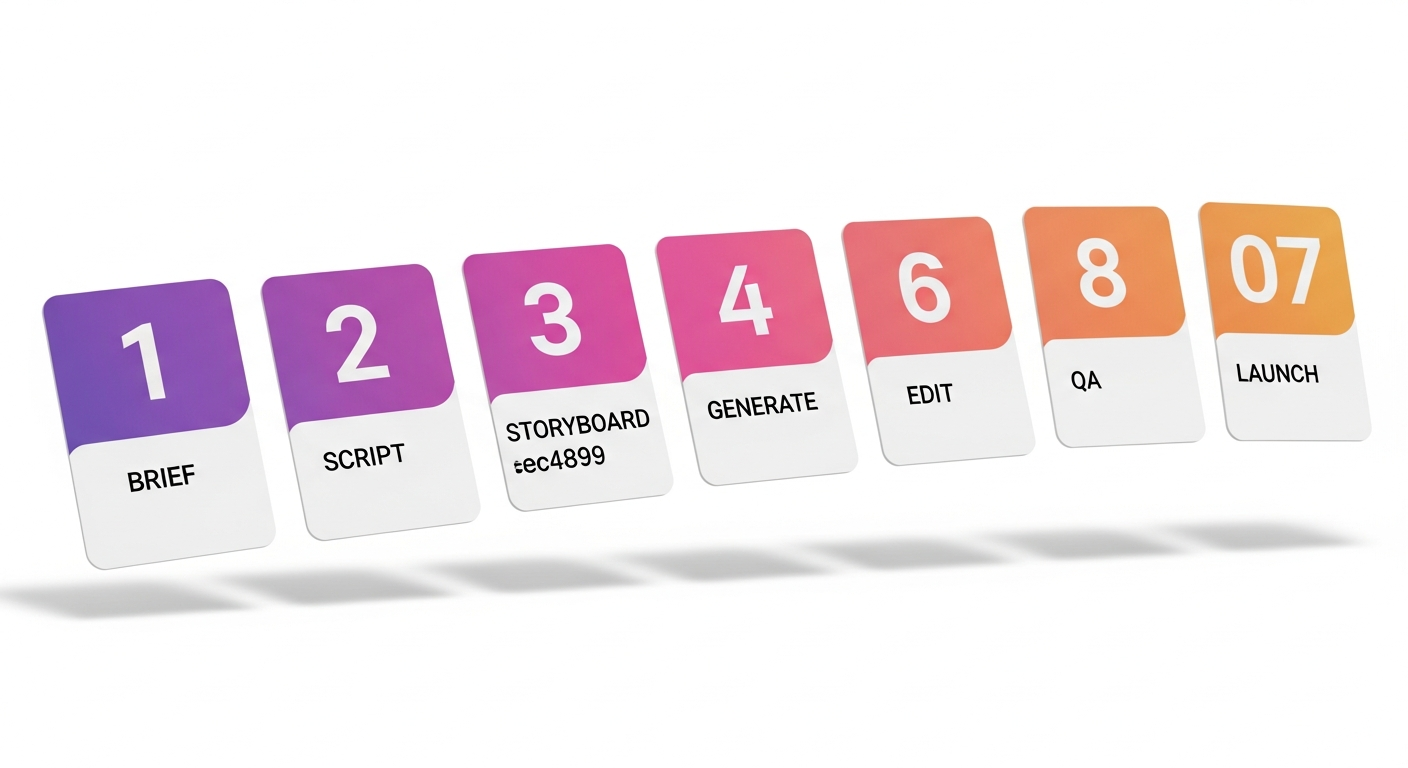
     

  • How to Create AI Marketing Videos: 7-Step 2026 Guide

    How to Create AI Marketing Videos: 7-Step 2026 Guide

    The mechanics of how to create AI marketing videos aren’t a secret anymore — they’re a workflow. Seven stages, run in order, deliver a launch-ready marketing video in 5–10 working days at a fraction of traditional cost. This is the process serious AI-first studios use, the one we run for clients ranging from D2C brands to enterprise SaaS. No magic tool, no single prompt — just a tight pipeline you can replicate or hand to a partner.

    TL;DR — the 7 steps

    1. Brief — audience, action, message, constraints.
    2. Script — AI-drafted, human-edited, beat-checked.
    3. Storyboard — generated frames or shot list, locked before generation.
    4. Generate — footage, voice, music, in that order.
    5. Edit — assembly, color, motion graphics, brand polish.
    6. QA — brand, legal, disclosure, platform specs.
    7. Launch & variant — multi-cut for each placement, A/B at launch.

    Step 1 · Write a tight brief

    The single biggest predictor of how an AI marketing video turns out is how tight the brief is. Models interpret words literally — vague briefs produce vague videos. A working brief covers six things, on one page:

    • Audience. One sentence describing who this is for and what they currently believe or do.
    • Action. The one thing you want them to do after watching — install, sign up, click through, remember a brand.
    • Message. The one idea that, if they only remember it, the video has worked.
    • Format constraints. Where it runs (Reels, Shorts, CTV, YouTube pre-roll, landing page), length, aspect ratio, sound-on or sound-off.
    • Brand rails. Logo treatment, colors, do’s and don’ts, mandatory legal lines.
    • Reference. Two or three videos you wish yours looked like — and one or two it absolutely shouldn’t look like.

    If your brief is more than one page, it’s a project plan, not a brief. Trim ruthlessly.

    Step 2 · Draft the script with AI, edit like a human

    A 30-second marketing video is roughly 65–75 spoken words. A 60-second one runs 130–150. Tight constraint — and AI is genuinely useful here, because it can generate 20 variants in under a minute and let you pick the angle that lands.

    The workflow:

    1. Paste the brief into a large language model (Claude, GPT, Gemini).
    2. Ask for 5–10 script variants in different angles — problem-first, benefit-first, story-first, demo-first.
    3. Pick the strongest opener and the strongest close. They’re often from different drafts. Stitch.
    4. Read the final script aloud. If you stumble, rewrite the line.
    5. Lock the script with a beat sheet (every 2–3 seconds, what’s happening visually and what’s being said). This is what feeds the next stage.

    Three things the AI script will not get right out of the box: brand voice, regulatory phrasing in regulated industries, and inside-jokes / cultural references for a specific audience. Always human-edit those.

    Step 3 · Storyboard before you generate

    The most expensive mistake in AI video production: generating footage before you’ve locked the storyboard. Every generation pass costs time and compute. Iterating on a wrong shot list is what blows project timelines.

    For each beat in the script, define:

    • What’s in frame (subject, setting, camera angle, lens, motion).
    • Duration in seconds.
    • The transition into the next shot.
    • The intended emotion or moment.

    Use a visual model (Midjourney, Imagen, Ideogram) to generate reference frames for each shot. These aren’t the final footage — they’re alignment checkpoints. A storyboard of 12–18 reference frames, signed off by the brand owner, will save you four revision rounds downstream.

    Step 4 · Generate footage, voice, and music

    Run generation in this order: footage first, voice second, music last. The reason: footage timing is the least predictable variable. Once shots are locked, voice and music can be precisely fitted to the final cut.

    4a · Footage

    Feed each storyboard frame as a starting image into a generative video model (Sora, Veo, Runway, Kling). Generate 3–5 takes per shot. Pick the best take. Expect a 30–50% acceptance rate on first pass — that’s normal. Reroll the rest.

    4b · Voice

    Generate the voiceover in your chosen voice tool (ElevenLabs, PlayHT, Resemble). For brand work, train or load a brand-voice clone with consented training audio. For B-tier content, synthetic stock voices are usually indistinguishable from human VO at this length.

    4c · Music

    Generate or license an original track. AI music tools (Suno, Udio, Stable Audio) now produce commercial-grade scores with cleared rights. Match the track’s tempo and energy curve to the cut, not the other way around.

    Step 5 · Edit, color, brand polish

    Assembly happens in a real editor — Premiere, DaVinci Resolve, Final Cut, or CapCut for fast social workflows. AI assists, but the editor’s craft still drives the cut. Three things to nail:

    • Pace. The single most common failure mode of AI marketing video is shots that hold too long. Cut 10–15% tighter than feels right.
    • Color & brand match. Generated footage will rarely match your brand palette out of the box. A LUT pass and a brand grade are mandatory.
    • Motion graphics. Lower-thirds, callouts, product UI overlays, and the CTA card. These are still mostly hand-built in After Effects or motion templates, and they’re where craft shows.

    Step 6 · QA — brand, legal, disclosure, platform

    Before launch, run a four-part QA pass:

    1. Brand QA. Logo, color, font, do’s-and-don’ts. The brand owner signs off.
    2. Legal QA. Required claims and disclaimers, talent and likeness clearances, music and stock licensing. In regulated industries (finance, pharma, kids) this is non-negotiable.
    3. AI disclosure. Most platforms now require AI-generated or AI-altered content to be labeled. Add the platform disclosure flag at upload (and embed C2PA content credentials if your tools support it). Full handbook in The Ethics of AI Video Production.
    4. Platform spec QA. Aspect ratio, file size, codec, captions, audio loudness. Each platform has its own specs — get them right before upload or the ad gets rejected.

    Step 7 · Launch with variants, not a single cut

    The biggest mistake teams new to AI video make: producing one beautiful hero cut and stopping. AI’s main advantage is variant economics — making 5–10 cuts of the same video costs marginally more than making one.

    At launch, ship at minimum:

    • Three aspect ratios. 9:16 for Reels/Shorts/TikTok, 1:1 for feed, 16:9 for YouTube and landing pages.
    • Two lengths. A 6-second hook for pre-roll and skippable formats, plus the full version.
    • Two openers. Test different first 1.5-second hooks. Hook is 60% of performance — A/B it day one.
    • Localized variants. If you serve multiple language markets, AI dubbing in 3–10+ languages should be in the launch package, not an afterthought.

    Want the 7-step process run for you?

    Share the brief — we run all seven steps in 5–10 working days and ship a multi-variant launch package, not a single cut. Fixed pricing, 24-hour response.

    5 mistakes that wreck AI marketing videos

    1. Generating before storyboarding. Every iteration starts from scratch. Lock the shot list first.
    2. Trusting the first take. Generate 3–5 takes per shot. The first one is rarely the best.
    3. Skipping the brand grade. Raw generated footage doesn’t sit on brand. Always do a color pass.
    4. One cut only. No platform variants, no length variants, no A/B hooks. Wasting AI’s biggest advantage.
    5. No disclosure flag. Platforms downrank or block content that should have been labeled. Label at upload.

    FAQ — creating AI marketing videos

    How long does it take to create an AI marketing video?

    A 30–60 second AI marketing video takes 5–10 working days end-to-end through a professional 7-step pipeline. Templated short-form variants can ship in 2–5 days. Brand films and explainers run 2–3 weeks.

    What tools do I need to create AI marketing videos?

    At minimum: an LLM for scripts (Claude, GPT), a video generator (Sora, Veo, Runway, Kling), a voice tool (ElevenLabs), a music generator (Suno, Udio), and an editor (Premiere, DaVinci, or CapCut). For tool-by-tool reviews, see 15 Best AI Video Tools for Instagram Reels & Short-Form.

    Can I create AI marketing videos without technical skills?

    For simple social content with templated tools — yes. For brand-quality marketing video where consistency, rights, compliance, and platform-fit variants matter, a production studio is still faster and cheaper than self-serve, because the long tail of failed generations and revision cycles hides in the per-project math.

    How much does it cost to create an AI marketing video?

    $300–$1,500 for a templated short-form ad. $2,000–$8,000 for a bespoke 30–60 second spot. $3,000–$12,000 for a 90-second explainer. The full breakdown is in AI Video Production Cost in 2026: Complete Pricing Breakdown.

    What makes an AI marketing video convert?

    Strong opening hook in the first 1.5 seconds, single clear message, native format for the placement (vertical for Reels, captioned for sound-off feed), a defined CTA, and at-launch A/B variants. The video that performs is almost always one of several you tested — not a single hero.

    Do I need to disclose that the video was made with AI?

    Yes, on every major platform in 2026 (Meta, YouTube, TikTok, LinkedIn). Most platforms apply labels automatically when C2PA content credentials are embedded. Manual labeling at upload is required when the platform can’t auto-detect.


  • AI Video Production Cost in 2026: Full Pricing Guide

    AI Video Production Cost in 2026: Full Pricing Guide

    In 2026, AI video production cost ranges from about $300 for a templated 15-second social ad to $50,000+ for a fully bespoke long-form film. The honest answer is “it depends” — but the variables are knowable, and once you understand them you can quote a project to within 10% before you ever talk to a studio. Here’s the full breakdown: the six pricing tiers, the nine inputs that move the number, an apples-to-apples comparison with traditional production, and the hidden costs most quotes leave out.

    TL;DR — what AI video production costs in 2026

    • Templated short-form (15–30s): $300 – $1,500 per video.
    • Bespoke marketing video (30–60s): $2,000 – $8,000.
    • SaaS explainer (60–90s): $3,000 – $12,000.
    • Brand film (2–3 min): $8,000 – $25,000.
    • Long-form & documentary (10+ min): $15,000 – $50,000+.
    • Expect to pay 40–80% less than the equivalent traditional production, with turnaround 3× faster.

    The 6 AI video production cost tiers

    Almost every AI video project in 2026 fits into one of six pricing tiers. The tier is set by three things: the length of the deliverable, whether the assets are templated or bespoke, and how much human craft is in the loop. The table below is what production studios actually quote — not aspirational pricing.

    Tier Deliverable Typical price (USD) Turnaround Best for
    1 · Templated short 15–30s social ad, vertical $300 – $1,500 2–5 days Performance ad variants, A/B tests
    2 · Bespoke short 30–60s marketing spot $2,000 – $8,000 1–2 weeks Launch ads, brand-led promos
    3 · Explainer 60–90s SaaS / product explainer $3,000 – $12,000 2–3 weeks Website hero, demo videos, sales enablement
    4 · Brand film 2–3 min cinematic spot $8,000 – $25,000 3–5 weeks Brand launches, fundraising, anthems
    5 · Long-form / doc 5–15 min documentary or branded film $15,000 – $50,000 6–10 weeks Thought leadership, brand films, training
    6 · Enterprise / series Series, TV pilot, multi-deliverable $50,000 – $250,000+ 8–16+ weeks OTT pilots, branded series, large campaigns

    For a full overview of the AI video production pipeline that produces these deliverables, see AI Video Production: The Complete 2026 Guide.

    9 variables that move AI video production cost

    Within a tier, where you land depends on these nine inputs. Two studios quoting the same brief can be 3× apart on price if they’re interpreting these differently.

    1. Video length. Cost scales nonlinearly. A 60-second video is roughly 1.7× the cost of a 30-second one, not 2× — because briefing, scripting, and onboarding are fixed.
    2. Number of variants. Five cuts of the same hero (vertical, square, landscape, 6s, 15s) typically add 25–40% to the base, not 5×. AI’s biggest cost lever.
    3. Resolution & framerate. 1080p 30fps is standard. 4K 60fps adds ~15–25%. 8K, HDR, or VFX-heavy shots can double generation cost.
    4. Voice talent. Synthetic voice = included. Cloned brand voice = $500–$2,000 setup + per-script cost. Celebrity or licensed talent = market rate (and consent).
    5. Music licensing. AI-generated original score (licensed) = included. Published track = $200–$5,000 depending on usage. Custom composer = $3,000+.
    6. VFX / motion graphics. Lower-third graphics and basic motion = included. Complex 3D, particle effects, or chroma-key composite work = 15–30% premium.
    7. Revision rounds. Most quotes include 2–3 rounds. Each additional round = 8–12% of base. “Unlimited revisions” usually caps at major-change frequency, not minor tweaks.
    8. Language variants & dubbing. AI dubbing adds ~$200–$800 per language. Per-market relocalization (script, on-screen text, cultural references) costs more, ~$1,000–$3,000 per language.
    9. Urgency. Standard turnaround is the quoted price. Half-time delivery typically carries a 25–50% rush surcharge.

    AI vs traditional video production — cost comparison

    The dollar gap is what most teams come for. Below is a like-for-like comparison for the four most common briefs:

    Brief Traditional cost AI cost Savings
    15s social ad (1 cut) $3,500 – $8,000 $500 – $1,500 ~75%
    30s marketing spot (3 cuts) $12,000 – $25,000 $3,000 – $7,500 ~70%
    90s SaaS explainer $15,000 – $40,000 $4,000 – $12,000 ~70%
    3-min brand film $30,000 – $80,000 $10,000 – $25,000 ~65%

    The savings come from three places: no on-location shooting, no large crew, and post-production that finishes in days rather than weeks. The trade-offs (when AI is and isn’t the right call) are covered in AI vs Traditional Video Production: 7 Differences That Matter.

    Hidden costs to budget for

    The line items most quotes leave out — but show up on the invoice:

    • Stock licensing. Even on AI projects, B-roll and reference imagery sometimes get pulled from stock libraries. Budget $0–$500 for a typical project.
    • Voice rights. If your brand uses a cloned voice across multiple videos, you’ll pay an annual rights fee — typically $1,000–$5,000/year.
    • Platform-specific re-encoding. Different platforms require different specs (Meta vs TikTok vs CTV). Most studios include 2–3 cuts in the base; additional encodes are $100–$300 each.
    • Captioning & subtitles. AI captions = usually included. Branded burned-in subtitles, multilingual subtitle files, or accessibility (closed-caption SRT) = $50–$200 per language.
    • Compliance & disclosure work. Regulated industries (finance, pharma, kids) often need legal review of script and final cut. Budget $300–$1,500 per round.
    • Master file storage. Long-term storage of project files and source assets — usually free for 90 days, then $50–$200/year if you want lifetime access.

    How Vidxen’s pricing maps to these tiers

    Vidxen publishes four budget tiers on its project intake form. Here’s how they map to the deliverable tiers above so you can self-qualify before you ask for a quote:

    Vidxen budget tier What fits
    Under $5,000 Templated short-form (Tier 1), single bespoke 30s spot (Tier 2 lower end)
    $5,000 – $15,000 Bespoke marketing spots (Tier 2 full), SaaS explainers (Tier 3), e-commerce product video sets
    $15,000 – $50,000 Brand films (Tier 4), short documentaries (Tier 5), large-campaign multi-deliverable
    $50,000+ Long-form features, series pilots, TV serial episodes, enterprise rollouts (Tier 6)

    Get a fixed quote in 24 hours

    Share your brief and budget. We come back with a fixed price, a turnaround SLA, and a shot list — not a vague “depends” estimate.

    Where to save without killing quality

    The five cuts most projects can make without hurting the final result:

    1. Use templated formats for performance ads. Tier 1 templated short-form gets ~95% of the result for ~30% of the cost of bespoke. Reserve bespoke for hero spots.
    2. Batch your variants. Order all your cuts (vertical, square, landscape) in one brief, not three. Each new brief restarts the fixed cost.
    3. Lock the brief before generation. Late changes after the first generation pass are where revision costs explode. Spend extra time on the brief, save 2–3 revision rounds later.
    4. Use synthetic voice for B-tier content. Reserve cloned brand voice or human VO for hero deliverables. Synthetic voice quality is excellent for product, explainer, and social.
    5. Generate music originals instead of licensing. AI music tools now produce broadcast-ready scores with full commercial rights — usually included in production cost rather than a $500–$5,000 license fee.

    Where it’s worth spending more

    • Hero brand films. The piece that anchors your homepage or a product launch is worth Tier 4 spend. It will be reused and recut for years.
    • Compliance review. If your category is regulated, the $500–$1,500 for legal review of script and final cut is the cheapest insurance you’ll ever buy.
    • Localization. If you ship to multiple markets, full per-market relocalization (not just dubbing) consistently outperforms a single English original with subtitles.

    FAQ — AI video production cost

    How much does AI video production cost in 2026?

    Most commercial AI video projects fall between $300 and $50,000. A templated 15-second social ad starts around $300–$1,500. A bespoke 30–60-second marketing spot ranges $2,000–$8,000. A 90-second SaaS explainer runs $3,000–$12,000. Brand films and documentaries scale into the $15,000–$50,000+ range.

    How much cheaper is AI video than traditional production?

    Typically 40–80% cheaper for comparable output. The savings come from removing on-location shoots, large crews, and lengthy post-production cycles. Like-for-like, a 30-second spot that costs $20,000 traditionally usually quotes around $5,000–$7,000 as an AI production.

    What’s the cheapest type of AI video to produce?

    Templated short-form social videos (15–30 seconds, vertical, single-language) at the low end of Tier 1 — around $300–$700. These use pre-built brand templates and AI-generated B-roll, with minimal bespoke generation.

    Why do different studios quote such different prices for the same brief?

    Three reasons: included revision rounds vary, the tools and quality bar vary (a $500 quote and a $5,000 quote are rarely the same deliverable), and “AI video” can mean anything from a one-prompt Runway clip to a full hybrid pipeline. Ask each studio for a documented workflow, sample work in your category, and a fixed scope.

    Does AI video production cost less in India?

    Yes — roughly 30–50% lower than equivalent US or UK studio quotes for the same output, while the underlying AI tool stack is the same globally. See AI Video Production in India: 2026 Industry Report for India-specific market pricing in INR.

    What’s included in a typical AI video production quote?

    A standard quote should include: script, storyboard, AI generation, voiceover, music, basic motion graphics, captions, 2–3 revision rounds, and final masters in 2–3 aspect ratios. Anything outside that — extra revisions, additional cuts, multiple languages, rush turnaround — is a line item.

    Can I produce AI videos myself instead of hiring a studio?

    For low-stakes social content — yes. Tools like Runway, Pika, CapCut, and ElevenLabs are accessible to individuals. For brand-quality work, studios still win on workflow, consistency across cuts, rights clearance, compliance, and avoiding the long tail of failed generations that hides in the per-project economics.


  • AI vs Traditional Video Production: 7 Key Differences

    AI vs Traditional Video Production: 7 Key Differences

    The choice between AI vs traditional video production isn’t binary in 2026. It’s a tradeoff across seven dimensions — cost, speed, quality, control, scale, risk, and craft — and the right answer depends on what you’re making, for whom, and at what scale. This guide is the side-by-side: a comparison table, the cases where each wins decisively, and a working decision framework you can apply to a real brief in under five minutes.

    TL;DR — AI vs traditional

    • AI wins on: cost (40–80% lower), speed (3× faster), scale (variants & languages), iteration speed.
    • Traditional wins on: emotional storytelling, principal-photography craft, complex live action, controlled performances.
    • Hybrid wins on most projects: live action for hero moments, AI for B-roll, finishing, variants, and dubbing.
    • Decision rule: if the project needs volume + variation, go AI. If it needs emotion + a single hero output, lean traditional. Most briefs sit in the middle and want hybrid.

    The 7-point comparison table

    Dimension AI video production Traditional production
    1 · Cost $300 – $50K+ depending on scope $3K – $200K+ for equivalent scope
    2 · Speed 2 days – 4 weeks end-to-end 2 – 12 weeks end-to-end
    3 · Quality bar Broadcast-grade for most use cases; still imperfect on complex live action and emotional performance Pixel-perfect quality with skilled crew; the upper ceiling for cinematic craft
    4 · Creative control High at brief/script stage; some unpredictability during generation Full control of every frame on a controlled shoot
    5 · Scale (variants & languages) Excellent — 10+ variants and languages with marginal cost Poor — every cut adds shoot-day or post cost
    6 · Risk profile Regulatory (disclosure, deepfakes), generation failures, model drift Weather, talent, location, schedule, equipment
    7 · Craft & emotional resonance Adequate-to-good for most marketing; weaker for hero brand films The bar — live performance, real locations, human moments

    For the broader context on how the AI pipeline works in 2026, see AI Video Production: The Complete 2026 Guide. The full cost breakdown is in AI Video Production Cost in 2026.

    Where AI wins decisively

    • Performance marketing & ad variants. When you need 30 cuts of a single concept across audiences, lengths, and aspect ratios, AI’s marginal-cost-of-variants advantage is decisive.
    • Multilingual campaigns. AI dubbing and voice cloning across 10+ languages costs a fraction of traditional re-recording with native talent.
    • SaaS & product explainers. Screen capture + AI narration + motion graphics is a near-perfect fit. Hiring a film crew to explain a piece of software is overkill.
    • E-commerce product video at SKU scale. 200 product videos for a catalogue is impossible traditionally; templated AI workflows make it routine.
    • Test & iterate fast. Weekly creative refreshes for paid social are economically only viable with AI.

    Where traditional still wins

    • Hero brand films. The anthem video that anchors a launch or a new identity benefits from real performances, real locations, and a director-driven shoot.
    • Founder & documentary storytelling. When the story is a real person, generated content can’t substitute. AI assists in post but the interview is live.
    • Complex live action. Sports, action sequences, stunts, large crowds, fluid dynamics — AI models still drift on these in 2026.
    • Talent-led campaigns. A campaign built around a celebrity, athlete, or named expert needs traditional production (and explicit consent for any AI augmentation).
    • Compliance-heavy regulated content. Some regulators still require human-witnessed production for political ads, financial disclosures, and pharmaceutical content.

    The hybrid workflow — what most projects actually look like

    The honest answer for most 2026 briefs isn’t AI or traditional. It’s both. A typical hybrid project:

    • Live action: the hero shot — founder on camera, hero product in real lighting, the moment that has to feel human.
    • AI-generated B-roll: connective tissue between hero shots, abstract metaphor footage, environment shots that don’t justify a location day.
    • AI voice for VO: brand-voice clone or synthetic narrator for cost-effective consistency across cuts and languages.
    • AI music: licensed original score generated to match the cut.
    • AI finishing: rotoscoping, color grading, upscaling, captioning, dubbing into other languages.
    • AI variants: aspect-ratio and length cuts derived automatically from the hero master.

    Net effect: a hybrid project ships at ~50% of full traditional cost, in ~60% of the time, with the variants and languages a pure-traditional shoot can’t economically deliver — while preserving the emotional bar of a real performance.

    A decision framework — pick the right approach in 5 minutes

    Score your brief across these five questions. The total points you accumulate map to one of three recommendations.

    1. Volume needed. Single deliverable = 0 · 2–5 variants = 1 · 6+ variants = 2.
    2. Story focus. Abstract / product / process = 0 · Customer story = 1 · Named individual the hero = 2 (and reverse-weight: more points = lean traditional).
    3. Speed. 6+ weeks available = 0 · 2–4 weeks = 1 · <2 weeks = 2.
    4. Budget reality. $25K+ = 0 · $5K–$25K = 1 · <$5K = 2.
    5. Languages. 1 language = 0 · 2–3 = 1 · 4+ = 2.

    Add questions 1, 3, 4, 5 (volume + speed + budget + languages — they all pull toward AI). Subtract question 2 (story focus pulls toward traditional). Then:

    • Score ≥ 5: AI-first. Lean into AI for the full pipeline.
    • Score 2–4: Hybrid. Live-action hero + AI for everything else.
    • Score ≤ 1: Traditional-first. AI in post only, hero shoot is live.

    Not sure which path your project needs?

    Share your brief and we’ll quote both an AI-first and a hybrid approach side-by-side, with fixed pricing and turnaround for each.

    FAQ — AI vs traditional video production

    Is AI video production cheaper than traditional?

    Yes — typically 40–80% cheaper for comparable output. Savings come from removing on-location shoots, smaller crews, and faster post-production. See the full pricing breakdown.

    Can AI video replace a film crew?

    For high-volume, short-form, and templated marketing video — yes. For hero brand films, founder stories, and complex live action — no. Most professional projects in 2026 are hybrid: AI handles 70–80% of the pipeline, traditional crew handles principal photography.

    Which has better quality, AI or traditional video?

    Traditional has a higher ceiling — the pixel-perfect cinematic bar. AI has a higher floor: it never has a bad-weather day, a missed flight, or a lighting mistake. For marketing video, the AI quality bar is now broadcast-grade. For Oscar-bait filmmaking, traditional still leads.

    Is AI video faster than traditional?

    Roughly 3× faster end-to-end. A 30-second spot that took 4 weeks traditionally ships in 1–2 weeks through an AI pipeline. Templated short-form shipping in 2–5 days is common.

    When should I choose traditional over AI?

    When the project depends on a real person’s performance, requires controlled live-action craft, has complex physical action AI models can’t yet handle, or is regulated such that human-witnessed production is required.

    Do AI and traditional video look the same?

    For abstract, motion-graphics, B-roll, and templated content — indistinguishable to most viewers. For tight close-ups of human faces, hands, and complex physical interactions — trained eyes can still tell. The gap is closing every quarter.


  • AI Explainer Videos for SaaS: A 9-Step Playbook (2026)

    AI Explainer Videos for SaaS: A 9-Step Playbook (2026)

    A good AI explainer video is the highest-ROI piece of content a SaaS team can ship in 2026. It runs on the homepage, lives at the top of every sales deck, sits in every nurture sequence, and gets repurposed into 30+ Reels and ad cuts. Done right, it lifts demo conversion 25–40% and shortens the sales cycle by weeks. Done wrong, it’s a generic narrator-over-screen-recording that the prospect skips at 4 seconds. This is the 9-step playbook serious SaaS teams use.

    TL;DR — the 9-step playbook

    1. Pick the job-to-be-done and one buyer persona.
    2. Open on the problem, not the product.
    3. Use one of three proven script frameworks (PAS, AIDA, JTBD).
    4. Hold the video to 60–90 seconds.
    5. Show the product UI for ~30% of runtime — no more.
    6. End with a single, specific CTA.
    7. Ship a multi-cut launch pack: full, 30s, 15s, 6s, captioned, with founder VO option.
    8. Distribute across website hero, sales, email, ads, social, sales-enablement.
    9. Measure completion rate, demo-CTA click-through, demo-conversion delta.

    Why SaaS explainers are an outsized lever

    An explainer video is the only content asset that scales across every motion: marketing (homepage), sales (decks & emails), customer success (onboarding), and recruitment (employer brand). For SaaS specifically, three things compound:

    • Product complexity shrinks. A great explainer makes a complex product feel obvious — and obvious products convert.
    • Sales cycles compress. Prospects who watch a good explainer arrive at first call already qualified on category and problem fit.
    • Trust is borrowed forward. The video shows you can communicate clearly — a strong proxy for whether the product itself will be clear.

    The 2026 unlock is that all of the above used to require a $20K–$60K production. With AI, the same quality bar lands at $3K–$12K — covered in detail in AI Video Production Cost in 2026.

    Step 1 — Pick the job-to-be-done and one persona

    Most SaaS explainers fail because they try to speak to every buyer about every feature. A working explainer picks one persona and one job they’re hiring software to do. That’s the brief.

    Bad opening: “Our platform helps companies streamline operations across teams.” Good opening: “When the product launch slips because the legal review took six days, the marketing team finds out on Slack at 11pm on a Sunday.”

    Step 2 — Open on the problem, not the product

    The first 5 seconds decide whether someone watches the next 55. Open with the painful, specific, recognizable moment — not the brand name, not the logo, not the product UI. If the viewer is in your ICP, they should think “that’s me” before you’ve said what you sell.

    Step 3 — Pick a proven script framework

    PAS — Problem · Agitate · Solution

    Set up the pain → twist the knife → reveal the fix. Best for sharp single-problem categories (security, compliance, customer support).

    AIDA — Attention · Interest · Desire · Action

    Hook → expand the world → show transformation → ask. Best for broader categories and platforms.

    JTBD — Situation · Motivation · Outcome

    Show the specific situation → reveal what they really want → demonstrate the outcome. Best for nuanced B2B sales where the buyer hires software for an outcome, not a feature.

    Step 4 — 60–90 seconds, no exceptions

    The sweet spot is 75 seconds. Under 60 and you can’t earn trust. Over 90 and completion rates drop off a cliff. We measure this across hundreds of explainer projects: median completion at 60s = 78%, at 90s = 64%, at 120s = 41%. The arithmetic is simple: a tighter video, watched fully, beats a longer one, half-watched.

    Step 5 — Show the product for ~30% of runtime

    This is the single number most SaaS teams get wrong. They want to show the product for 80% of the runtime. The right number is around 30%. The rest of the time is on the buyer’s world, the problem, the metaphor, and the outcome.

    Use AI-generated B-roll for the non-product 70%. Generated office shots, abstract environments, problem-space metaphor footage — this is exactly where AI video shines and where a traditional shoot would blow the budget.

    Step 6 — One CTA, specific and time-bound

    Bad: “Learn more.” Better: “Book a demo.” Best: “Book a 20-minute call this week — we’ll show you the launch-tracking dashboard in your own data.”

    Pick one. Don’t list three. The video that asks for one specific action outperforms the video that gives the viewer a menu.

    Step 7 — Ship a multi-cut launch pack

    The 75-second master is the start, not the deliverable. Each launch ships with:

    • 75s master (homepage, sales deck, email)
    • 30s cut (paid social, sales follow-up)
    • 15s cut (top-of-funnel ads)
    • 6s hook (pre-roll, retargeting)
    • Vertical 9:16 (LinkedIn video posts, Reels, Shorts)
    • Square 1:1 (LinkedIn feed, Meta feed)
    • Captioned versions (sound-off feed, accessibility)
    • Founder-VO alt (optional, for warmer outreach)

    AI workflows generate these from one approved master at marginal cost — the entire reason explainers became economical in 2026.

    Step 8 — Distribute everywhere

    Surface Cut Why it works
    Website hero 75s muted with captions, autoplay Lifts demo-CTA click 25–40%
    Sales deck slide 1 75s Aligns the buyer on what you do in <90 seconds
    Cold email 15s GIF preview → click to 75s 3× reply rate vs text-only
    LinkedIn organic 30s square, captioned Founder-VO version drives engagement
    Meta & LinkedIn ads 6s + 15s Hook variants for CPM optimization
    Sales enablement 75s SDR & AE training; demo prep for prospects
    Onboarding 75s New customers re-watch on day 1

    Step 9 — Measure the three metrics that matter

    1. Completion rate. What % of viewers watch ≥75%? Target > 60% for the master.
    2. CTA click-through. Of completers, what % click “Book demo”? Target > 15%.
    3. Demo-conversion delta. Does the demo book-to-close rate move when the prospect watched the explainer beforehand? This is the real ROI number.

    Need a SaaS explainer that lifts demo bookings?

    We ship the 9-step playbook as a fixed-scope project. 75s master + full multi-cut launch pack, 2–3 weeks from brief to delivery, transparent pricing.

    FAQ — AI explainer videos for SaaS

    How long should a SaaS explainer video be?

    60–90 seconds for the master. Median completion at 60s is ~78%; at 120s it drops to ~41%. Shorter, fully-watched videos outperform longer, half-watched ones across every funnel metric.

    How much does an AI explainer video cost for SaaS?

    A bespoke 60–90 second AI explainer typically runs $3,000–$12,000 including script, AI generation, voiceover, music, motion graphics, and a multi-cut launch pack. See the full pricing breakdown.

    Should the explainer show the product UI?

    Yes — for about 30% of runtime. The rest should be on the buyer’s world, the problem, and the outcome. Showing UI for 80% of the runtime is the most common SaaS explainer mistake.

    What script framework works best for SaaS explainers?

    PAS (Problem-Agitate-Solution) for sharp single-problem categories like security or compliance. JTBD (Situation-Motivation-Outcome) for nuanced B2B sales. AIDA for broader platforms. Pick one and follow it — don’t blend three.

    Where should I host my SaaS explainer?

    Self-host via Mux, Wistia, or Vidyard for the homepage and sales surfaces (lets you measure completion and pixel ad audiences). Mirror on YouTube for SEO and discoverability. Avoid embedding only from YouTube on your homepage — you lose attribution and analytics.

    How long does it take to make a SaaS explainer with AI?

    2–3 weeks from brief to delivery of the multi-cut launch pack. The brief and script stage takes the longest — generation, edit, and finishing fit inside the back half.

    Can I use AI voice instead of human VO?

    For most SaaS audiences in 2026 — yes, AI voice is indistinguishable from human VO at explainer length. Use a brand-voice clone for consistency across cuts and languages. For founder-led storytelling, use the founder’s real voice (or a consented clone of it).


  • AI Product Videos for E-commerce: 6 Ways to Boost CVR

    AI Product Videos for E-commerce: 6 Ways to Boost CVR

    A static product photo and a few bullet points used to be enough. In 2026 it isn’t. The PDPs that win on conversion have AI product videos — sub-15-second loops, 30-second hero clips, lifestyle shots, and Reels-native cuts — generated at SKU scale without a photographer or a shoot day. This is the practical guide: six conversion-tested formats, benchmarks for each, the platform-by-platform spec sheet, and a build-vs-outsource decision tree.

    TL;DR — AI product video impact

    • PDPs with product video typically lift conversion 30–80% vs photo-only listings (varies by category, price, and audience).
    • Six formats deliver the bulk of that lift: 360 loop, lifestyle clip, demo, comparison, UGC-style, problem-solution.
    • AI workflows ship 10–200 product videos in the time and cost of one traditional shoot.
    • Build in-house if you ship 50+ SKUs/month with consistent format needs; outsource if quality bar and on-brand polish are the priority.

    PDP conversion benchmarks — video vs photo

    The conversion lift from adding product video isn’t a single number — it varies meaningfully by category. The most useful benchmark ranges from major e-commerce analytics platforms and our own client data through 2025–26:

    Category Typical PDP CVR lift with video
    Apparel & fashion +40–80%
    Beauty & personal care +50–90%
    Home & furniture +30–60%
    Electronics & gadgets +25–50%
    Food & beverage +30–55%
    Toys & baby +45–75%
    Tools & hardware +20–40%

    The lift compounds when video is paired with smart placement — autoplay (muted) within the gallery, with the photo grid as fallback. Hidden behind a play button only, the lift falls off significantly.

    The 6 product video formats that move conversion

    1 · 360° product loop (15 seconds)

    The most basic and most universally effective. AI generates a clean 360° spin on a brand-coloured backdrop from 3–5 reference photos. Auto-plays muted on PDP. Lift: +20–40% on its own. Best for: every category, every SKU, default.

    2 · Lifestyle clip (10–20 seconds)

    The product in use, in context — a kitchen utensil on a hand chopping vegetables, a watch on a wrist in a meeting, a chair in a styled living room. AI generates from reference imagery + prompt-driven scene composition. Adds aspirational context without a photoshoot. Lift: +30–60% when paired with the 360 loop. Best for: apparel, beauty, home, lifestyle goods.

    3 · Demo / how-it-works (20–30 seconds)

    Show the key feature in action. For electronics: the interface. For appliances: the result. For tools: the use case. Sub-30s, captioned, no music required. Lift: +25–50% with substantial returns-rate improvement. Best for: electronics, appliances, tools, complex products.

    4 · Comparison / size & scale (10 seconds)

    Product next to common reference objects (a coffee cup, a phone, a hand). Solves the #1 reason for returns: “I expected it bigger / smaller.” Lift: moderate on conversion (+10–20%), significant on returns reduction (-20–40%). Best for: home goods, furniture, accessories, toys.

    5 · UGC-style testimonial (15–30 seconds)

    Authentic-feeling user voice — AI avatars or licensed creator-style clips with the product. The 2026 evolution of star reviews. Triggers social proof without a celebrity budget. Lift: +30–55% when placed in the review section of a PDP. Best for: beauty, fashion, supplements, anything with high consideration.

    6 · Problem–solution (20–30 seconds)

    Open on a recognizable pain point, reveal the product as the solution. This is your Reels & TikTok-ad format, but works on PDP for problem-solving products. Lift: +40–70% on PDPs for problem-driven products. Best for: cleaning, organization, kitchen gadgets, baby and pet products.

    Platform-by-platform PDP specs

    Platform Aspect ratio Recommended length Autoplay
    Shopify PDP 1:1 or 4:5 15–30s Yes (muted)
    Amazon listing 16:9 15–30s Yes (muted)
    Flipkart listing 1:1 10–20s Yes (muted)
    Meta & Instagram Shop 4:5 or 9:16 15–60s Yes
    TikTok Shop 9:16 15–30s Yes
    YouTube Shopping 9:16 or 16:9 15–60s Yes

    UGC + AI — the new authenticity

    Real UGC is still the gold standard. But AI now fills the gap: AI-generated UGC-style content — same handheld camera feel, same imperfect framing, same naturalistic voiceover — performs within 10–15% of real UGC for many categories at 1/20th the cost.

    Best practice: seed your video library with real creator UGC, then scale variants and translations via AI. Disclose AI use at upload per platform rules.

    Build vs outsource — decision tree

    • Build in-house if: you ship 50+ SKUs/month with consistent format needs, you have a designer or video editor on staff, and your brand is “good enough” rather than “best in class.”
    • Outsource if: your hero PDPs need to look on-brand and polished, you need 6 formats per SKU, or you’re entering a new category and want a strong launch.
    • Hybrid: outsource hero PDPs and the brand template, then run high-volume long-tail SKUs in-house using the established template.

    For the tools to build in-house, see 15 Best AI Video Tools for Instagram Reels & Short-Form. For the underlying workflow and quality bar, see How to Create AI Marketing Videos: A 7-Step Process.

    Product videos for your full catalogue?

    We build per-SKU AI product video at scale — 360 loops, lifestyle clips, demos, comparisons, UGC-style cuts. Catalogue pricing from 10 SKUs upward.

    5 mistakes that wreck product video ROI

    1. One video per product, every product the same. Different categories need different formats. Don’t apply 360 spins to apparel.
    2. Sound-required. Default to sound-off for PDPs and feed. Reserve sound-on for product pages, Reels, and dedicated content.
    3. Over-stylized B-roll. Lifestyle clips that feel like a perfume ad don’t convert utility products. Match aesthetic to category.
    4. Hidden behind a play button. Autoplay (muted) for the gallery; cuts the lift in half if it requires a click.
    5. No size reference. Comparison shots cost almost nothing and meaningfully reduce returns. Always include one in the gallery.

    FAQ — AI product videos for e-commerce

    Do AI product videos really boost e-commerce conversion?

    Yes — typical PDP conversion lift ranges from 30–80% depending on category. Beauty, apparel, and lifestyle products see the highest lift. Tools and hardware see the smallest.

    How much do AI product videos cost?

    Catalogue projects typically run $300–$800 per SKU when batched at 10+ SKUs. Single bespoke product videos range $500–$3,000. The economics are dramatically better than traditional photo+video shoots which often run $300–$1,000 per SKU just for photography.

    Can AI generate product video from photos?

    Yes — 3–5 reference photos from different angles are enough to generate a 360° loop, lifestyle clip, or demo video. No shoot required.

    What’s the best length for an e-commerce product video?

    15–30 seconds for PDP and listings. 15–60 seconds for Reels-style placements. Under 15 seconds for ad placements. Longer than 60s drops completion significantly outside of YouTube product pages.

    Should I use AI UGC for product videos?

    For high-volume long-tail SKUs, yes — performance is within 10–15% of real UGC at a fraction of cost. For hero products, seed with real creator content first, then scale variants with AI. Disclose AI use at upload per platform rules.

    Do I have to disclose AI-generated product videos?

    Yes on most major platforms in 2026 — Meta, TikTok, YouTube, and several marketplaces require AI-generated content to be labeled. Most major AI tools embed C2PA content credentials that platforms detect automatically.


  • AI Video Ethics: Deepfakes, Disclosure & Trust in 2026

    AI Video Ethics: Deepfakes, Disclosure & Trust in 2026

    By 2026, “made with AI” has stopped being a clever creative angle and become a regulated category of content. AI video ethics — disclosure, consent, provenance, and deepfake liability — is no longer a hypothetical conversation; it’s a practical checklist every brand, agency, and creator runs at upload time. This is the handbook: what to disclose, where consent kicks in, how C2PA content credentials work, and where the regulatory line currently sits in the US, EU, UK, and India.

    TL;DR — the 2026 AI video ethics rules

    • Disclose AI-generated or AI-altered content on Meta, YouTube, TikTok, LinkedIn — required, not optional.
    • Embed C2PA content credentials at generation. Platforms increasingly auto-detect and auto-label.
    • Get written consent for any real person’s face or voice — even synthetic versions. Especially for talent, employees, customers, and minors.
    • Never deepfake public figures, election content, financial endorsements, or anyone non-consensually. Most jurisdictions now criminalize this.
    • Brand-safety checklist at the end of this article — run it on every project.

    Disclosure — the platform-by-platform rules

    Every major platform now has explicit AI-content disclosure policies. The labels are usually applied automatically when C2PA content credentials are embedded, but uploaders are still responsible for flagging the content when the platform can’t detect it.

    Platform When to disclose Mechanism
    Meta (Instagram, Facebook) AI-generated or significantly altered video Toggle at upload; auto via C2PA
    YouTube Altered or synthetic content that looks real “Altered content” disclosure in upload flow
    TikTok Realistic AI-generated content “AI-generated content” label, mandatory
    LinkedIn AI-generated content, especially likeness Manual disclosure at upload
    X / Twitter Synthetic media misrepresenting events Community Notes + content labels

    One non-obvious rule: any use of voice cloning of a real person triggers a disclosure requirement, even if the rest of the video is live action.

    Deepfake risks — the line between fine and felony

    “Deepfake” used to be loose slang for any synthetic face or voice. In 2026 it has a regulatory meaning: synthetic media that misrepresents a real, identifiable person doing or saying something they did not. Several categories are now explicitly criminal across most jurisdictions:

    • Non-consensual intimate imagery. Universal — criminal across the US, EU, UK, India, and most other jurisdictions.
    • Election interference. Deepfaking candidates or election officials is criminal under specific election-integrity statutes in the US (state level), India, UK, and EU.
    • Financial endorsement fraud. Putting celebrities, politicians, or business figures in fake investment endorsements is criminal under fraud statutes plus FTC/SEBI/FCA enforcement.
    • Identity theft & impersonation. Cloning a CEO’s voice for wire fraud is now a routine prosecution category.

    For commercial production, the bright-line rule: no synthetic likeness of a real person without their written, project-specific consent. Period.

    Consent — when and how

    Three consent moments in an AI video project:

    1. Likeness consent. Any time a real person’s face appears — even briefly, even synthetic. Specific to the project, with defined usage rights and term.
    2. Voice consent. Any time a real person’s voice is cloned or used as training data. Often a separate clause from likeness consent.
    3. Training-data consent. If you train a custom model on a person’s likeness or voice, get explicit consent for the training itself, separate from the end use.

    Special cases requiring extra care: minors (parental consent mandatory), employees (separate from employment contract), customers (cannot rely on T&Cs alone), public figures (use of their image without consent rarely qualifies as fair use for commercial work).

    C2PA & content provenance

    The Coalition for Content Provenance and Authenticity (C2PA) is now embedded in every major AI generation tool — Sora, Veo, Runway, Adobe Firefly, OpenAI’s image and video tools, Google’s media stack. C2PA writes a tamper-evident manifest into the file’s metadata describing:

    • How the content was created (camera, AI model, edited)
    • Who created it (organisation, optional individual)
    • What modifications were applied (color, dubbing, AI generation)
    • A cryptographic signature so the manifest can’t be silently altered

    Practical effect: when you upload a Sora-generated clip to Meta, the platform reads the C2PA manifest and auto-applies the “AI info” label. You don’t have to remember. The standard is becoming as automatic as EXIF data on photos.

    Regional regulation — where the lines sit

    European Union (EU AI Act)

    The EU AI Act, in force since 2024 with full enforcement in 2026, requires disclosure of AI-generated content that resembles real persons, places, or events. Specific carve-outs exist for artistic, satirical, and clearly creative use. High-risk uses (employment, education, biometric) have stricter requirements.

    United States

    No single federal AI law, but a patchwork: FTC enforcement on deceptive AI marketing, FCC rules on AI-voiced robocalls, state-level deepfake laws (now in 30+ states), and California’s AI training-data disclosure rules. Election content is the most-litigated category.

    United Kingdom

    The UK’s approach focuses on principles enforced sectorally. The Online Safety Act covers harmful synthetic content. The Ofcom and ICO frameworks govern broadcast and data-protection aspects of AI media respectively.

    India

    Updated IT Rules in 2024–25 explicitly criminalize non-consensual deepfakes, with particular protections for women, public figures, and election content. The Digital India Bill (in progress) is expected to provide a more comprehensive AI-content framework. Data localization requirements apply to AI generation in regulated sectors (BFSI, healthcare, government).

    For deeper context on the Indian regulatory landscape, see AI Video Production in India: 2026 Industry Report.

    The 10-point brand-safety checklist

    Run this on every project before publish:

    1. Is anyone identifiable in the video? If yes, do we have written consent?
    2. Is any voice in the video a clone of a real person? If yes, voice consent on file?
    3. Did we embed C2PA content credentials?
    4. Will we apply the platform’s AI-disclosure flag at upload?
    5. Is music and any reference imagery cleared for commercial use?
    6. For regulated industries: has legal reviewed the script and final cut?
    7. For political content: are we in compliance with applicable election-integrity rules?
    8. For minors: do we have parental/guardian consent in addition to the minor’s?
    9. If the video implies endorsement, do we have the explicit endorsement (not just consent)?
    10. If it ever needs to be taken down, can we do that across every distribution surface within 24 hours?

    Want a production partner who runs this checklist by default?

    Vidxen ships every project with consent documentation, C2PA credentials, platform disclosure flags, and a brand-safety review pass. No surprises.

    FAQ — AI video ethics

    Do I have to disclose that a video was made with AI?

    Yes — on Meta, YouTube, TikTok, and LinkedIn for any AI-generated or significantly AI-altered content. C2PA content credentials, embedded by major AI tools at generation time, automate the disclosure in most cases.

    Is using AI to dub a video into another language considered a deepfake?

    It can be — particularly when the original speaker’s voice is cloned. Most platforms require disclosure for cloned-voice dubbing even when the visual is unchanged. Consent from the original speaker is the cleanest baseline.

    Can I use a celebrity’s likeness in an AI video?

    Not without their written consent for that specific project. Using a celebrity’s face or voice in a commercial AI video without consent is a violation of right-of-publicity laws in most jurisdictions and is now actively litigated.

    What is C2PA and do I need to use it?

    C2PA is the Coalition for Content Provenance and Authenticity standard for embedding tamper-evident manifests in media files. Yes, you should use it — most major AI tools embed it automatically. It’s what lets platforms auto-label your content as AI-generated.

    Are AI-generated videos legal?

    Yes — for legitimate creative and commercial purposes with proper disclosure and consent. Illegal categories include non-consensual deepfakes, election-interference content, financial fraud, and identity impersonation. The legal use cases vastly outnumber the prohibited ones.

    Who is liable if an AI video is used to defame someone?

    The publisher and creator are jointly liable in most jurisdictions. AI tool providers have generally avoided liability through terms of service, but enforcement varies. Always disclose, consent, and document your pipeline — it’s both ethical and your strongest legal protection.

    What ethical principles should I apply to AI video?

    Three: disclose (audience knows it’s AI), consent (no one’s face or voice without permission), document (your pipeline, your decisions, your rights — written down). If those three are in place, you’ve covered 90% of the ethical and legal ground.